BytePip
How to send MT5 trades to Telegram automatically (VIP and Free channels)
Post every trade you take in MetaTrader 5 to your Telegram channels without typing a message: openings, stop and target changes, partial closes and results. Plus how to run a VIP and a Free channel from the same account.
Why post your trades automatically
If you run a signal channel by hand, you already know the routine: open the trade, switch to Telegram, type the symbol, the entry, the stop and every target, and do it again for every change and every close. It costs time, it delays the signal, and a single typo reaches every subscriber.
Posting automatically fixes that, and it does something more important for a signal provider: every trade is posted, including the losers. Subscribers trust a channel whose messages come straight from the terminal far more than one that posts screenshots of its best trades.
What your subscribers should see
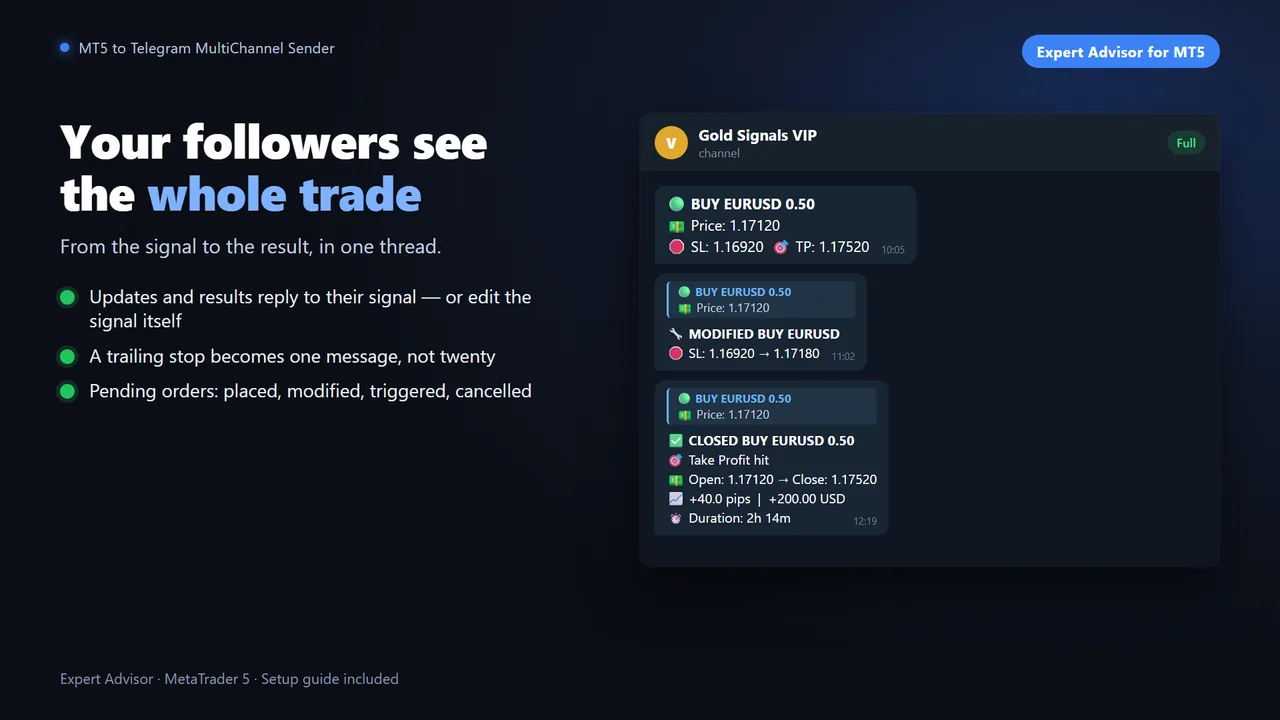
- The opening with symbol, direction, entry, stop loss and take profit, posted the moment the trade opens.
- Every change of stop or target, as a reply to the original signal so the whole trade reads as one thread.
- Partial and full closes with the result in pips, the duration and the reason: target hit, stop hit or closed by hand.
- Pending orders: placed, modified, triggered, cancelled or expired.
- Not your account size. Showing risk as a percentage instead of lots, and profit as a percentage of balance, keeps your balance private.
Step by step: MT5 to Telegram in 5 minutes
This is the setup with the MT5 to Telegram MultiChannel Sender. Everything is configured from a panel on the chart; the inputs can stay blank.
- Create your Telegram bot. In Telegram, open @BotFather (the official one has a blue check mark), send /newbot, choose a name and a username ending in bot. BotFather replies with a token like 1234567890:AAH…. That token is the password of your bot: never share it.
- Add the bot to your channel. Channel → Administrators → Add Admin → your bot, with at least Post messages. Then post any message in the channel, a simple “hello”, so the EA can find it. Repeat for each channel.
- Allow Telegram in MetaTrader 5. Tools → Options → Expert Advisors → tick Allow WebRequest for listed URL and add https://api.telegram.org.
- Attach the EA to one chart. Any symbol: the EA reports the whole account. Leave the inputs blank and press OK. The panel opens with a setup assistant in three steps: Bot token → Paste, Allow api.telegram.org → Check and Add your channels → Detect.
- Switch your channels on and send a test. Detected channels are added switched off. Turn on the ones you want and press the paper plane to send a test message.
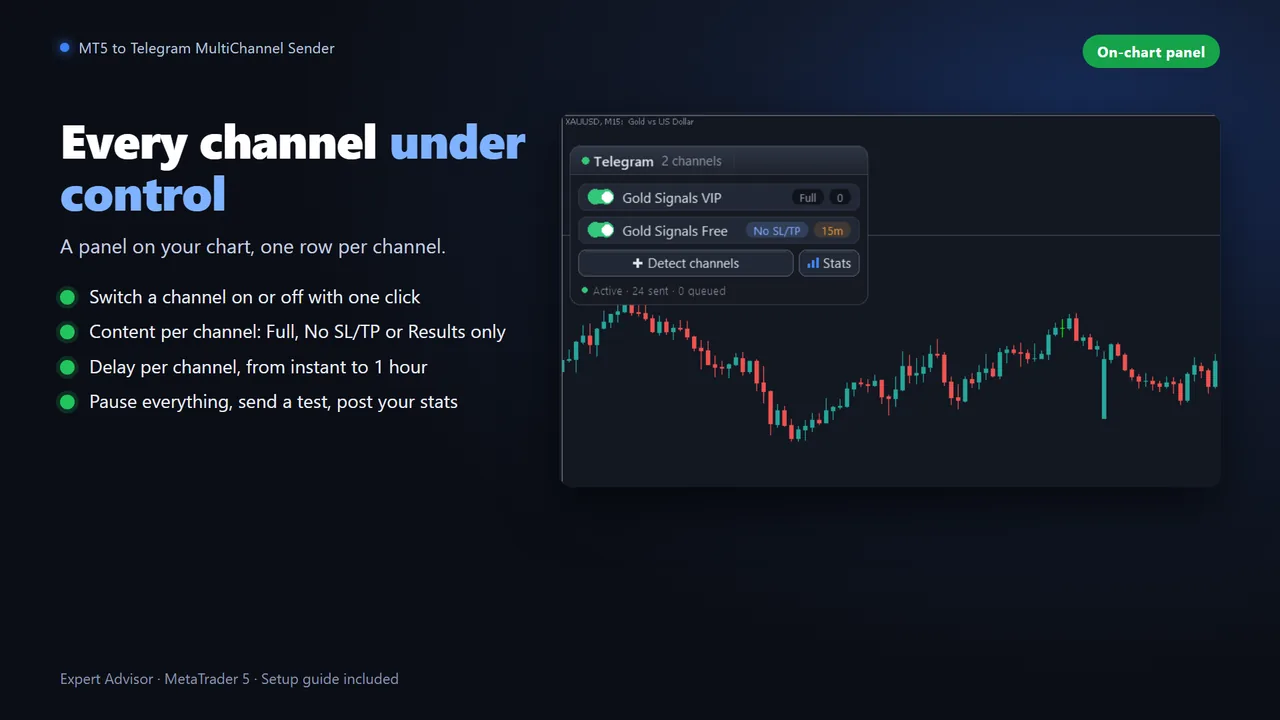
From then on, every trade on the account is posted by itself: manual trades and trades opened by any EA, filtered by magic number or symbol if you want.
A VIP and a Free channel from one account
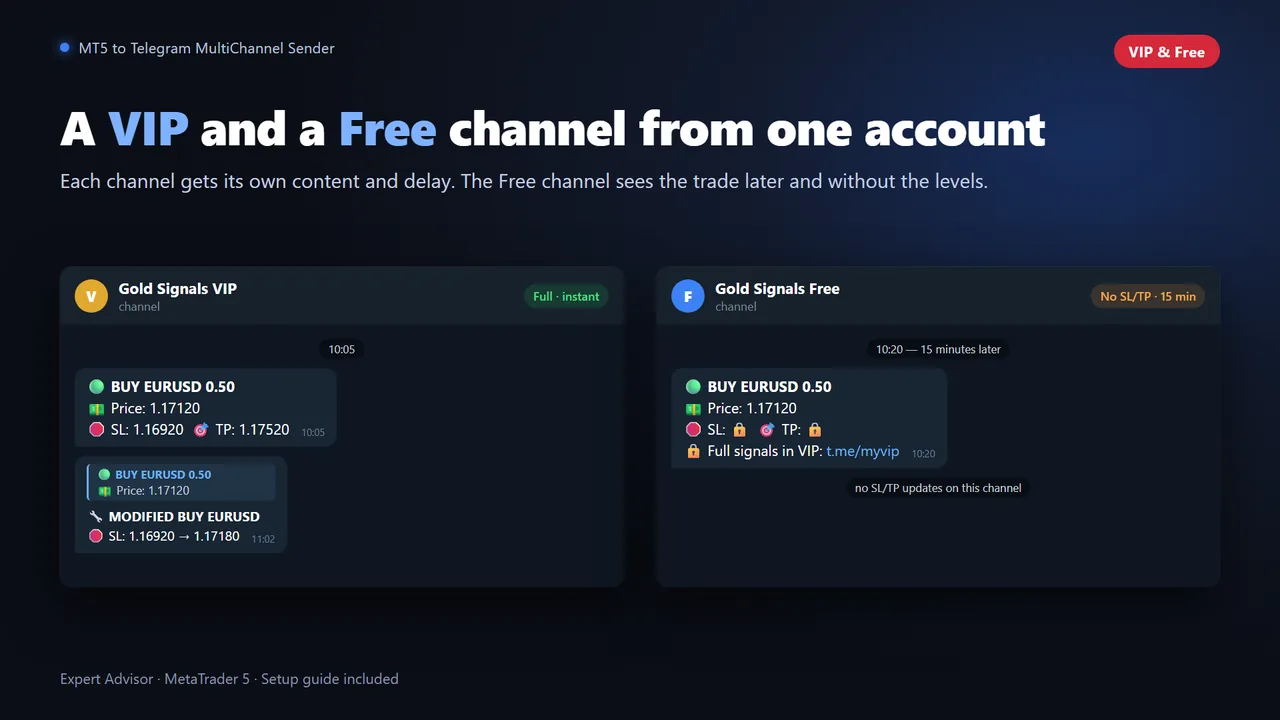
The most common model for signal providers is a paid VIP channel with everything in real time and a free channel that shows enough to make people want the VIP. With the Sender, each channel has its own settings, changed with one click on the chart:
- Content: Full (everything), No SL/TP (the signal with the levels hidden 🔒) or Results (only the outcome).
- Delay: from 0 to 60 minutes before the opening is posted. Updates never go out before their signal.
- An invitation line on the limited channel, for example “Full signals in VIP”.
A typical setup: VIP with Full and no delay, Free with No SL/TP and a 15-minute delay. Free subscribers see that the channel trades and wins, and VIP subscribers get it first and complete.
Post your trades while you trade
MT5 to Telegram MultiChannel Sender: every event of your account, VIP and Free channels, a message editor and watermarked screenshots.
Tips before you go live
- Use a dedicated bot. If another program uses the same bot, the channels cannot be detected.
- Attach the EA to one chart only. A second copy on the same account stays silent on purpose, so subscribers never get a message twice.
- Run it on a VPS if you want your channel updated while your PC is off.
- Let subscribers copy you. The Sender's default messages are read as they are by the Telegram Copier, so your subscribers can copy your trades into their own MT4 or MT5.
Questions
How do I send MT5 trades to a Telegram channel?
Create a Telegram bot with @BotFather, add it as an administrator of your channel, allow https://api.telegram.org in MetaTrader 5 (Tools, Options, Expert Advisors, WebRequest) and attach an EA such as the MT5 to Telegram MultiChannel Sender to one chart. From then on every trade is posted automatically.
Does the EA open or close trades?
No. The MT5 to Telegram MultiChannel Sender only reports the activity of your account to Telegram. It never trades.
Can I hide my lot size and balance?
Yes. Show risk as a percentage instead of lots and profit as a percentage of balance, so subscribers never see your account size.
Can I run a VIP and a Free channel at the same time?
Yes. Each channel has its own content (full, levels hidden or results only) and its own delay of 0 to 60 minutes, from the same account.
Can my subscribers copy my trades automatically?
Yes. The Sender's default messages are read as they are by the Telegram to MT5 Multi-Channel Copier, including stop and target changes, partial closes and closes.